
Barcode Lists
Internal Chrome Extension for Calgary Coop that streamlines barcode management with shared access and AI-powered extraction.
Context & Overview
Calgary Coop store personnel scan barcodes every Monday as part of inventory operations. Previously, these barcodes were tracked manually or lost between shifts, causing repeated work and data inconsistency across staff members. Barcode Lists was built as an internal Chrome Extension to centralize barcode storage, enable shared access across all store personnel, and use AI to handle complex image and spreadsheet extraction.
The Challenge
Problem Statement
Store personnel had no centralized system to save and reuse scanned barcodes. Data was siloed per individual, leading to duplicate scans, lost records, and wasted operational time.
Why It Matters
Accurate barcode tracking is critical for inventory management at scale. Errors cascade into stock discrepancies, ordering issues, and wasted labor hours across multiple store locations.
Constraints
- Must work within Chrome browser (no native app install).
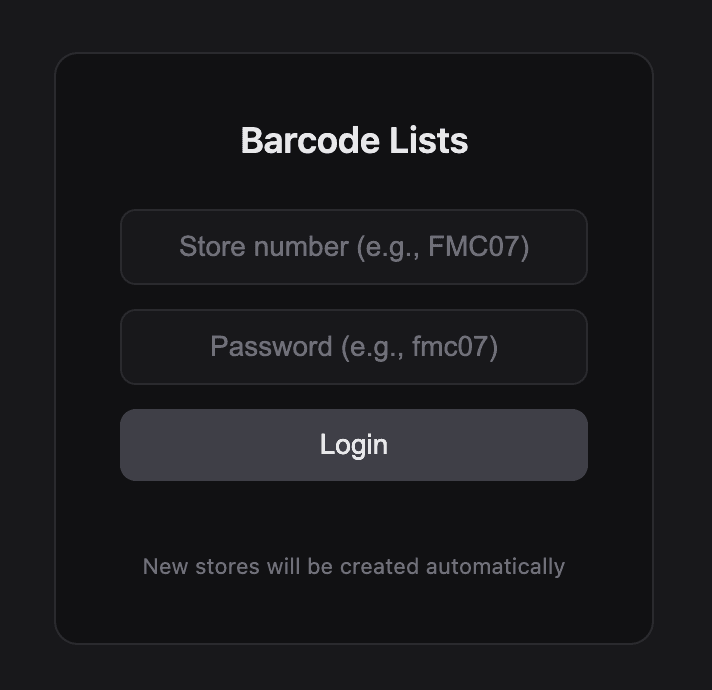
- Shared data access requires authentication to protect store data.
- Must handle noisy inputs: invoice numbers, extra spaces, and complex image formats.
Goals & Metrics
Objectives
- Provide a shared, persistent barcode storage system accessible by all authorized personnel.
- Automate barcode extraction from images and spreadsheets using AI/OCR.
- Eliminate manual cleanup by intelligently filtering invoice numbers and whitespace.
Target KPIs
- Time saved per scanning session
- Data accuracy (clean barcodes vs raw input)
- User adoption across store personnel
Research & Discovery
Methodology
Key Insights
- Personnel often re-scan barcodes that were already captured by a colleague on a different shift.
- Images from scanners often contain invoice numbers mixed with barcodes, causing manual sorting.
- A shared login system was the top-requested feature to enable cross-shift collaboration.
Approach & Strategy
Build a lightweight Chrome Extension with cloud-synced storage and AI-powered OCR to handle the full pipeline: capture, clean, store, and share barcodes.
Frameworks
Chrome Extension Manifest V3, OCR + AI Image Processing, Shared State Architecture
Collaboration
Direct feedback loop with Calgary Coop store staff during development and testing.
The Solution
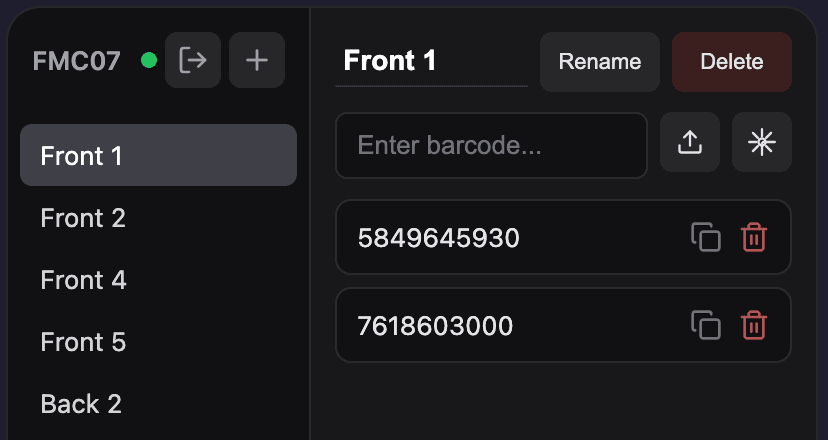
A Chrome Extension that allows store personnel to save, manage, and share barcode lists. Users log in to access a shared database, so barcodes saved by one person are instantly available to all authorized staff. AI-powered OCR reads complex images and spreadsheets to extract barcode numbers, automatically removing invoice numbers and cleaning whitespace.
App Visuals
Design Rationale
Chrome Extension was chosen because all store operations already happen in the browser. No app install friction, and Manifest V3 ensures security and performance.
Execution
Roadmap
Week 1
Core extension setup, barcode CRUD, and authentication system
Week 2
AI/OCR integration for image & spreadsheet extraction, Chrome Web Store deployment
Challenges Overcome
- ⚠ Extracting clean barcodes from noisy images that mix invoice numbers with actual barcodes (Solved with AI refinement pipeline).
- ⚠ Ensuring real-time data sync across multiple users logged into the same store account.
Outcomes & Impact
Quantifiable Results
- 1.Live on Chrome Web Store (v3.2)
- 2.4 active users across Calgary Coop locations
- 3.Eliminated duplicate scanning across shifts
Qualitative Feedback
“Store staff reported significant time savings on Monday scanning workflows.”
“AI extraction reduced manual barcode cleanup to near zero.”
Learnings & Future
Key Takeaways
- Internal tools don't need to be complex — they need to be reliable and fit the existing workflow.
- AI-powered data cleaning is a massive force multiplier for operational tools.
Next Steps
- Multi-store rollout across more Calgary Coop locations
- Batch export functionality for inventory systems
- Offline mode for areas with poor connectivity